
An IDE that sits next to the engine
Open a folder and the bridge and the skills land in place. A code index comes up, build and debug attach, and beside them you can order work from the editor that is already running.
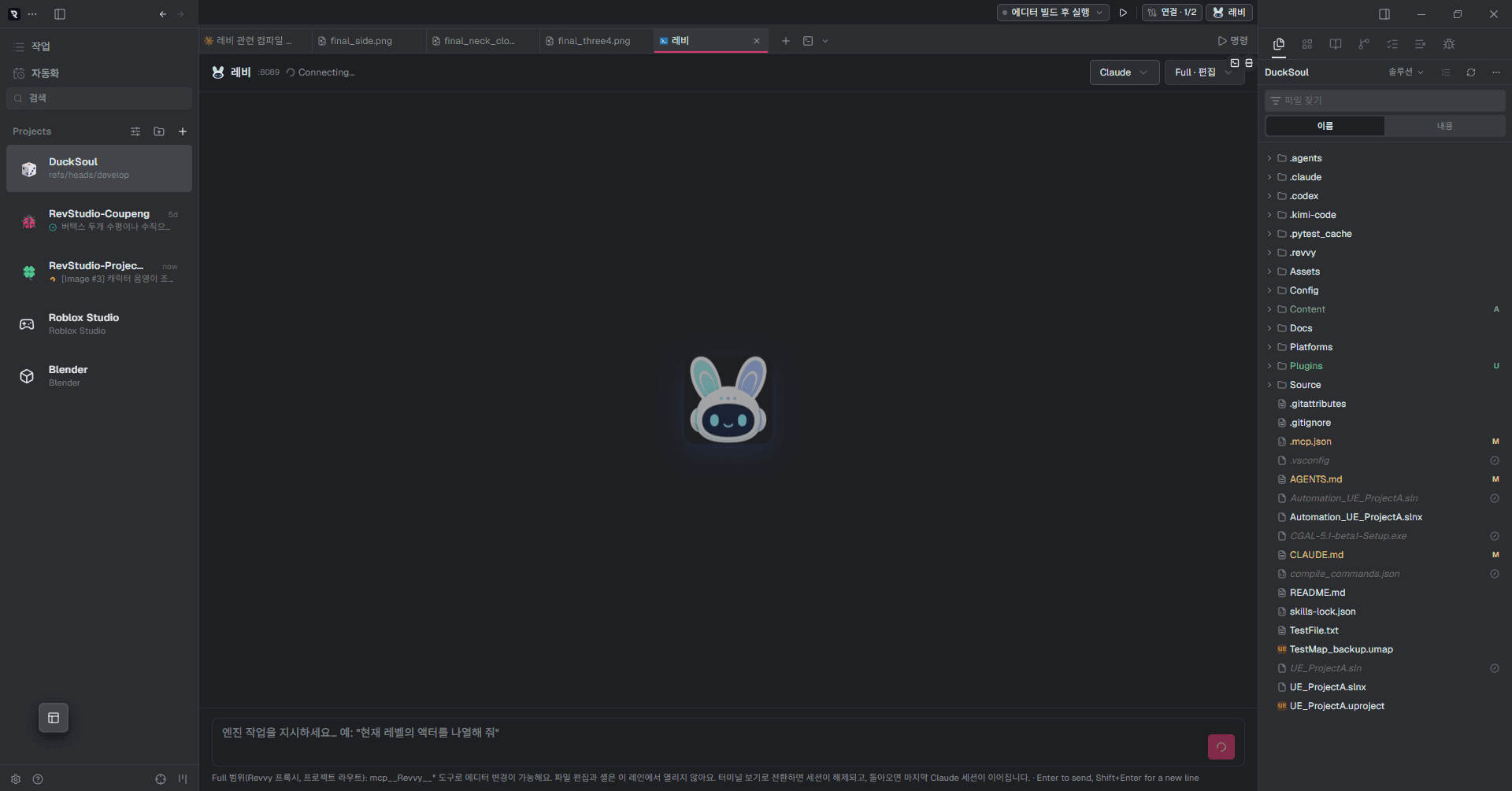
Opening the folder is the setup
There is no configuration screen to get through first. Add a project and Reddy works out which engine it is, then puts what it needs in place.
Marker files identify the engine
.uproject, then ProjectSettings, then project.godot, then default.project.json — in that order.
A first bridge install does not ask
It creates a folder that was not there, so it runs and says so. It asks when it updates, when it enables the plugin, and when an install fails.
The agent wiring comes with it
A read-only and an edit endpoint are registered in .mcp.json. The token is never written to the file — only an environment reference.
Files you edited are never overwritten
The install records a hash of every file it wrote. If one of them has changed by the next update, Reddy names it and stops.
Claude, Codex and Kimi all read one .revvy/shared-memory.md. Leave decisions and conventions there and the next session picks them up, whichever model shows up.

Order work from the running editor
Revvy is a tab inside the IDE — one per project. What you ask goes through the bridge into the editor that is already open. The chat panel that used to live inside the Unreal editor is gone; there was no reason to keep the same conversation in two places.
Switching agent or scope opens a fresh session. On Claude, /resume brings the previous thread back.

And it is still an IDE
It is not one window that talks to the editor. Editor, terminals, Git and browser are in a single workspace, with an engine-project layer on top of them.
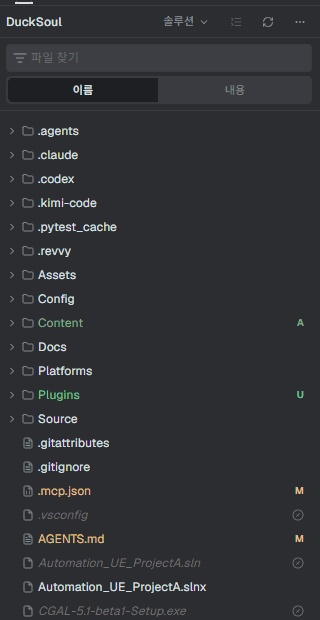
A solution, not a file tree
Unreal's Intermediate and Saved, Unity's Library and Temp, Godot's .godot are taken out; Content and Assets stay. Hiding works off folder names, so anything it cannot classify still shows — this explorer is also where an agent picks up assets.
The code index comes first
Opening your first .cpp runs UnrealBuildTool to write compile_commands.json. You do not wait for a first build before CoreMinimal.h and AActor resolve, and completion, go-to-definition, find-references and rename attach. The language servers are clangd, OmniSharp and Godot's own — and nothing is downloaded behind your back.
Derived Blueprint counts on UCLASS
Above a UCLASS declaration, how many Blueprints subclass it. With the editor closed it draws nothing — silence beats a wrong number.
Worktrees and automation
Open worktrees side by side and run several agents inside one of them. 35 coding CLIs are supported, and scheduled automation creates its own workspace and runs headless.
Build and debug without leaving
No switching to the engine to compile and back. Run configurations ship per engine, errors collect in the Problems panel, and a double-click lands on the file and line.

| Engine | Run configuration | What it does |
|---|---|---|
| Unreal | Build and run editor | Compiles the editor target and opens it if the build succeeds. |
| Build editor | Compiles the editor target with UnrealBuildTool. Does not open it. | |
| Run editor | Opens the editor without compiling, from the last build. | |
| Debug editor | Runs the compiled editor under the debugger. | |
| Automation tests | Runs the project's automation tests headless. | |
| Unity | Open editor | Opens this project in the Unity editor. |
| Compile solution | Builds the C# solution Unity generated. | |
| Attach to editor | Attaches the debugger to a running Unity editor. | |
| Edit Mode tests | Runs the Unity Test Framework in batch mode. | |
| Godot | Open editor | Opens this project in the Godot editor. |
| Import project | A headless import pass. Surfaces parse errors in every script. | |
| Debug current scene | Attaches to the Godot editor's debug adapter. | |
| GUT tests | Runs GUT headless. |
- The build target is not guessed. Reddy reads *.Target.cs under Source to find the real editor target, so a project renamed from a sample still builds.
- Output is parsed in four formats — MSVC, clang, linker and Godot — and CP949 console output on Korean Windows is decoded rather than mangled.
- Breakpoints attach through each engine's real debug adapter: cppvsdbg for Unreal, vstuc for Unity, Godot's own.
The skills are already installed
Starting the app copies 85 bundled skills into your agent folders. No network, no install step. Installing the Unreal bridge puts its own tree of 95 alongside the project.
Nothing is downloaded
The skills ship inside the app. They are copied only into agent folders that already exist — Reddy will not create one for a CLI you do not use.
Your edits survive
Content hashes decide what to update. A skill you changed is left alone.
They are not all read
Names and descriptions stay as a list; the body of a skill is opened when the work calls for it.
Some of what is in there
Engines and tools
| Target | Connection | What works today |
|---|---|---|
| Unreal Engine 5.8 | Revvy editor plugin (C++ / MCP) | Blueprints, assets, materials, animation, landscape, audio, UI, project settings, PIE playtests, screenshots. Build, debug, automation tests, code index |
| Godot 4.5+ | Dependency-free GDScript bridge (11 tools) | Scene inspect/create/mutate, play mode, viewport capture, simulated input, properties, instance overrides. Headless import, debug adapter |
| Unity 6000.3+ | Editor package bridge (11 tools) | Scene inspect/create/mutate, play mode with pause/step, viewport capture, properties, prefab overrides. Solution compile, attach debugger |
| Blender 4.5 LTS / 5.x | Machine-wide bridge (22 tools) | Scene / mesh / UV / animation inspection, mesh edits, modifiers, materials, import & export |
| Roblox Studio | Studio's built-in MCP server (28 tools) | Game-tree search, script read & edit, Luau execution, playtests, mesh & material generation, console, screenshots |
Blender and Roblox attach as tool workspaces with no project. Reddy checks whether they are already running, so Launch never opens a second instance. Roblox has no run configurations.
Scope and boundaries
The honest option: show the default on screen and keep the switch in one place.
- A new engine project defaults to Full
- Turn it off once in Settings and new projects open in Safe from then on. Which one you are in is always on the chat toolbar.
- Safe inspects, Full edits
- Safe allows editor inspection and reading logs and screenshots. Either way, file edits and shells do not open in this lane.
- Revoking closes the session
- Revoke in Settings and a live session closes within seconds.
- The bridge and the MCP servers stay on this machine
- Both are loopback. The capability token lives in the app process and never reaches the UI layer.
- A refusal looks like a refusal
- Without permission Reddy says what was blocked instead of quietly downgrading the request.
Getting started
Download Reddy
Windows installer, auto-updating
Sign in to an AI CLI
Claude Code or Codex, whichever you use
Add a project
Add an Unreal, Unity, Godot or Roblox folder and the bridge attaches
Build it
“Build and run editor” from the run bar
Open the Revvy tab
Try “summarize what’s in the current level”
Blender and Roblox need no project: add them from + → Tool workspaces.
Windows will warn you on install
This build does not carry a code signing certificate yet, so Windows shows a SmartScreen warning about an “unknown publisher”. To install, choose [More info] and then [Run anyway].
The certificate is being issued; this note goes away when it lands.
- Code signing certificateIn progress
FAQ
- Which AI does it use?
- The Claude Code or Codex CLI you already have. Reddy asks for no separate API key and uses your existing login and subscription.
- Do my project files leave my machine?
- The bridges and MCP servers Reddy opens are loopback-only. Model traffic is whatever your own AI CLI does with your account.
- What if the editor isn't running?
- Requests that inspect or change the editor need it open; Reddy says so and stops. Builds and the code index do not need it.
- What doesn't it do?
- No cooking or packaging — builds stop at the editor target. Roblox has no run configurations, the build path is Windows-only today, and there is no inline ghost-text completion.
- Other engine versions?
- Unreal targets 5.8. Godot is written against the 4.5 API and directly verified on 4.6.1. Unity targets 6000.3.
- Is it free?
- The Reddy app is distributed by RevStudio. Model costs follow the AI CLI account you use.